
Quick start#
Find individual nuclei in an RGB colour image using a pretrained CellPose model. Download the CellPose checkpoint and set the image and checkpoint paths below to your files. Keep the image at its original pixel size: shrinking it also shrinks the nuclei the model needs to find. This example adds a small border when needed and removes it from the predicted masks.
This checkpoint expects global min-max normalization, which rescales the image’s pixel values to 0–1. Use the preprocessing specified for your weights when choosing a different checkpoint.
from pathlib import Path

import numpy as np
import torch
from PIL import Image

from cellseg_models_pytorch.models.cellpose import CellPose
from cellseg_models_pytorch.transforms.functional.normalization import minmax_normalize

device = torch.device("cuda" if torch.cuda.is_available() else "cpu")
with Image.open("data/image.png") as source:
    raw_image = np.asarray(source.convert("RGB"))
image = minmax_normalize(raw_image, copy=True)
height, width = raw_image.shape[:2]
image = np.pad(image, ((0, -height % 32), (0, -width % 32), (0, 0)), mode="reflect")

model = CellPose.from_pretrained(Path("checkpoints/cellpose.safetensors"), device=device)
model.set_inference_mode(mixed_precision=False)
prediction = model.predict(image)
result = model.post_process(prediction, use_async_postproc=False)
instances, classes = result["nuc"][0]
instances, classes = instances[:height, :width], classes[:height, :width]
instances has the same height and width as the image. Zero means background;
each positive number identifies one nucleus. classes gives each nucleus a
category number, whose meaning depends on the checkpoint.
This checkpoint uses class IDs 0–6.
See the predictions#
Plot the nucleus outlines over the original image, with the predicted masks
beside it. Install matplotlib if needed: pip install matplotlib.
import matplotlib.pyplot as plt
from skimage.color import label2rgb
from skimage.segmentation import mark_boundaries

overlay = mark_boundaries(raw_image, instances, color=(0, 1, 1))
instance_colours = label2rgb(instances, bg_label=0)
class_mask = np.ma.masked_where(instances == 0, classes)
class_colours = plt.get_cmap("tab10", 7).with_extremes(bad="black")

fig, axes = plt.subplots(1, 3, figsize=(12, 4), layout="constrained")
axes[0].imshow(overlay)
axes[0].set_title("Predicted outlines")
axes[1].imshow(instance_colours)
axes[1].set_title("Instance mask")
class_plot = axes[2].imshow(class_mask, cmap=class_colours, vmin=-0.5, vmax=6.5)
axes[2].set_title("Cell-type mask")
fig.colorbar(
    class_plot, ax=axes[2], ticks=range(7),
    label="Class ID", shrink=0.75,
)
for axis in axes:
    axis.set_axis_off()
plt.show()
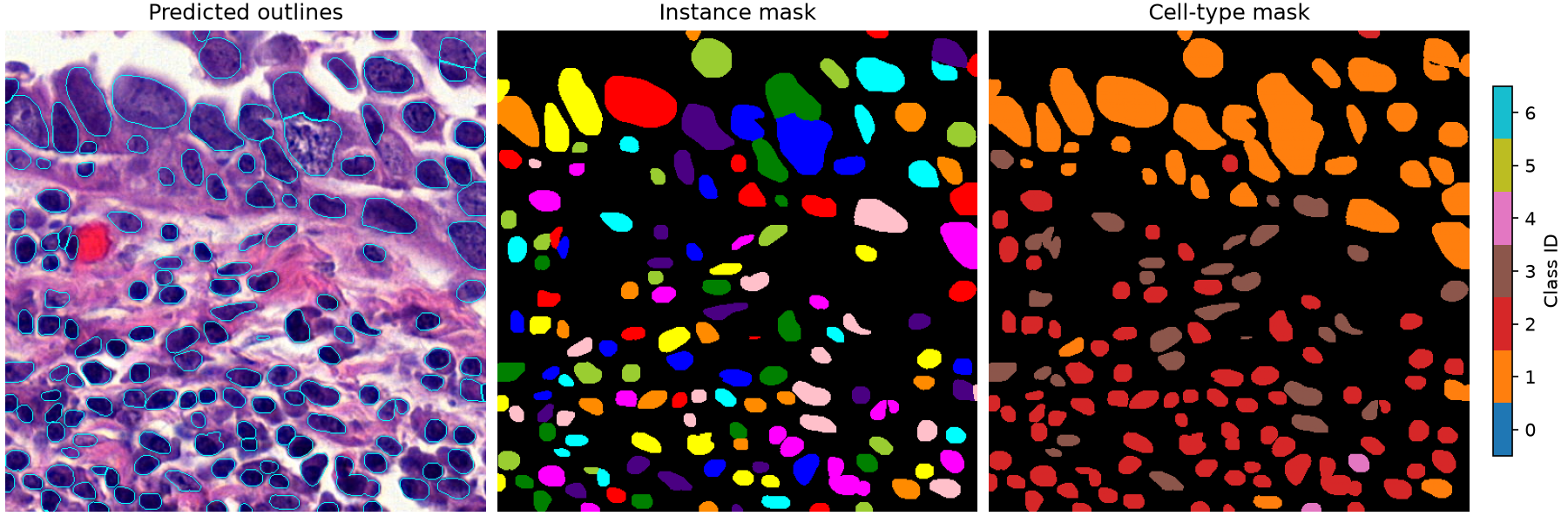
CellPose predictions on the original 500 × 500 example image, without resizing. Each colour in the instance mask identifies a separate nucleus. Colours in the cell-type mask show class IDs; check the checkpoint’s mapping for their meaning.#
For a runnable demonstration, output saving and larger images, continue with image inference. To train a model, start with training.
For arguments and output details, see the model reference and normalization reference.