
Image inference#
Use the PanopTILs model from training to find nuclei and cell types in a validation image. Each instance label identifies one nucleus; a class label gives its type. Compare predictions with the dataset labels, then save the predicted masks.
Complete data preparation and training first. This example uses their data and saved model. For public pretrained weights, use the csmp-hub loading example below.
Setup#
import json
from pathlib import Path

import matplotlib.pyplot as plt
import numpy as np
import torch
from matplotlib.patches import Patch
from safetensors import safe_open
from skimage.color import label2rgb

from cellseg_models_pytorch.inference.post_processor import PostProcessor
from cellseg_models_pytorch.metrics import panoptic_quality
from cellseg_models_pytorch.models.cellpose import CellPose
from cellseg_models_pytorch.transforms.functional.normalization import minmax_normalize
from cellseg_models_pytorch.utils import FileHandler


# Prefer CUDA, using the same device choice as the training example.
torch.set_num_threads(2)
device = torch.device("cuda" if torch.cuda.is_available() else "cpu")
print(f"Device: {device}")

data_root = Path("../../data/panoptils-nuclei")
checkpoint_path = Path("training-checkpoints/epoch_05/model.safetensors")
Device: cuda
Load a csmp-hub model#
To use pretrained weights without training a model, load the HGSC CellPose checkpoint by its registered name. The weights download on first use.
pretrained_model = CellPose.from_pretrained("hgsc_v1_efficientnet_b5", device=device)
pretrained_model.set_inference_mode(mixed_precision=False)
Use the preprocessing and cell-type mapping in the model card. These classes differ
from PanopTILs. The walkthrough below uses the locally trained PanopTILs model.
Load the trained model#
# Read the cell-type meanings stored alongside the trained weights.
with safe_open(checkpoint_path, framework="pt", device="cpu") as weights:
    class_names = json.loads(weights.metadata()["class_names"])

model = CellPose.from_pretrained(checkpoint_path, device=device)

# Keep full precision to match the training example’s validation.
model.set_inference_mode(mixed_precision=False)

# Reconstruct nucleus instances from the predicted CellPose flows.
model.post_processor = PostProcessor("cellpose", {"use_gpu": device.type == "cuda"})
Load a validation image#
# Keep the validation image at its original size.
image_path = sorted((data_root / "validation/regions/images").glob("*.png"))[0]
raw_image = FileHandler.read_img(image_path)
labels = FileHandler.read_mat(
    data_root / "validation/regions/labels" / f"{image_path.stem}.mat"
)

# Match the global min-max normalization used for training.
image = minmax_normalize(raw_image, copy=True)
Predict nuclei and cell types#
# Predict dense maps, then reconstruct nuclei and assign their cell types.
prediction = model.predict(image)
result = model.post_process(prediction, use_async_postproc=False)

# The nucleus branch returns one instance/type-mask pair per input image.
instances, classes = result["nuc"][0]

print("Predicted nuclei:", len(np.unique(instances[instances > 0])))
print("Instance PQ:", round(panoptic_quality(labels["inst"], instances)["pq"], 3))
Predicted nuclei: 623
Instance PQ: 0.686
Compare the masks#
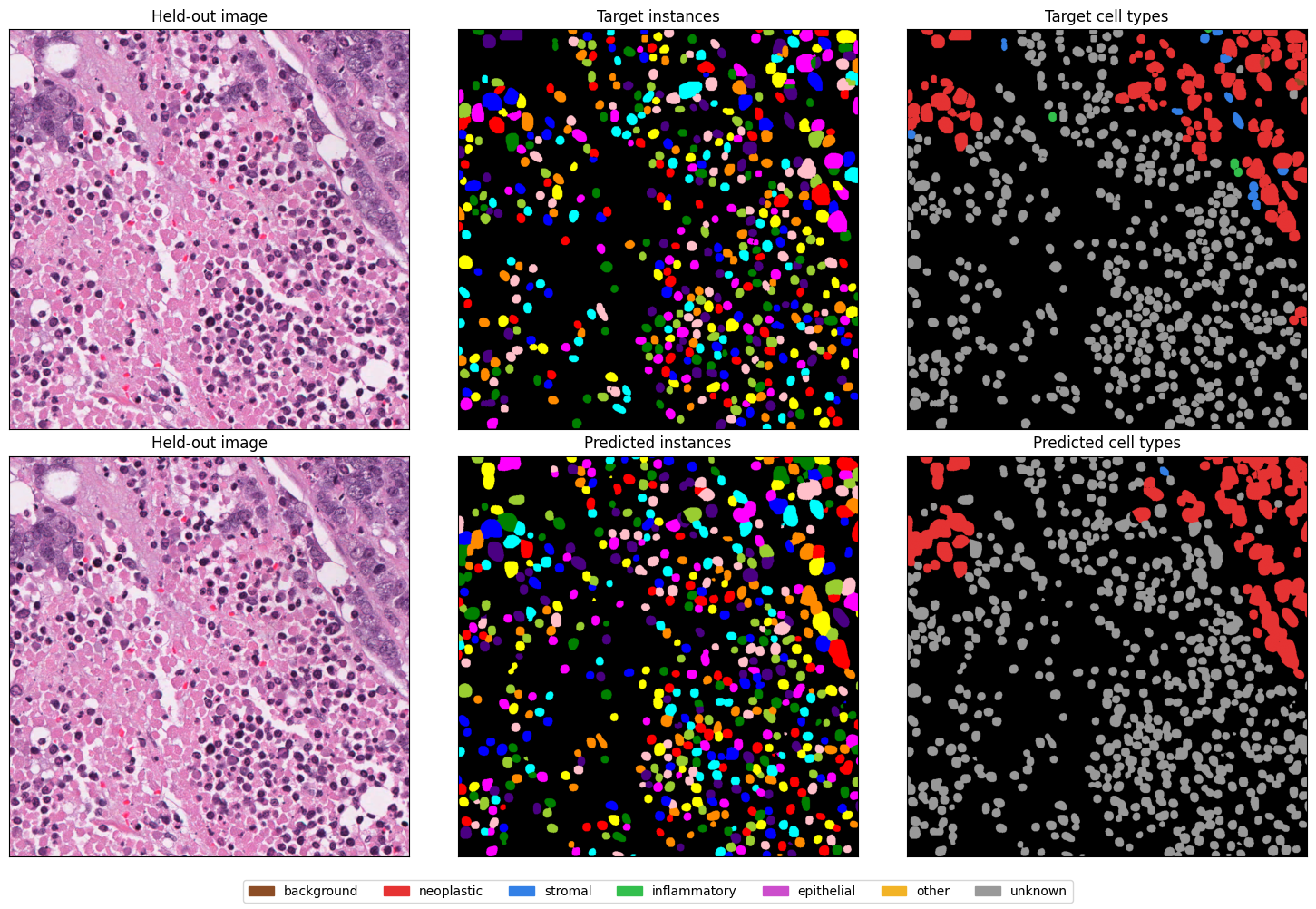
Compare the same tissue image with its labels and predictions. Panoptic quality (PQ) measures nucleus matching and overlap; 1 is perfect. This score describes one image. The training example checks 16 validation images.
The legend identifies tumour (neoplastic), supporting tissue (stromal) and immune (inflammatory) cells. “Unknown” means the dataset did not assign a specific type. Brown nuclei were assigned class 0; black is background with no nucleus.
# Use the same class colours for targets and predictions.
class_palette = np.array(
    [
        [0.55, 0.3, 0.15],
        [0.9, 0.2, 0.2],
        [0.2, 0.5, 0.9],
        [0.2, 0.75, 0.3],
        [0.8, 0.3, 0.8],
        [0.95, 0.7, 0.15],
        [0.6, 0.6, 0.6],
    ]
)

# Instance colours distinguish individual nuclei, regardless of cell type.
instance_colors = label2rgb(instances, bg_label=0)

# Instance masks distinguish background from nuclei assigned class 0.
class_colors = class_palette[classes]
class_colors[instances == 0] = 0

target_class_colors = class_palette[labels["type"].astype(int)]
target_class_colors[labels["inst"] == 0] = 0

fig, axes = plt.subplots(2, 3, figsize=(15, 10))

# Top row: the validation image and its ground-truth masks.
axes[0, 0].imshow(raw_image)
axes[0, 0].set_title("Held-out image")

axes[0, 1].imshow(label2rgb(labels["inst"], bg_label=0))
axes[0, 1].set_title("Target instances")

axes[0, 2].imshow(target_class_colors)
axes[0, 2].set_title("Target cell types")

# Bottom row: the same image and the model’s predictions.
axes[1, 0].imshow(raw_image)
axes[1, 0].set_title("Held-out image")

axes[1, 1].imshow(instance_colors)
axes[1, 1].set_title("Predicted instances")

axes[1, 2].imshow(class_colors)
axes[1, 2].set_title("Predicted cell types")

for axis in axes.flat:
    axis.set(xticks=[], yticks=[])

fig.legend(
    [Patch(color=colour) for colour in class_palette],
    class_names,
    loc="lower center",
    ncol=7,
)
fig.tight_layout(rect=(0, 0.04, 1, 1))
plt.show()
Predict with sliding windows#
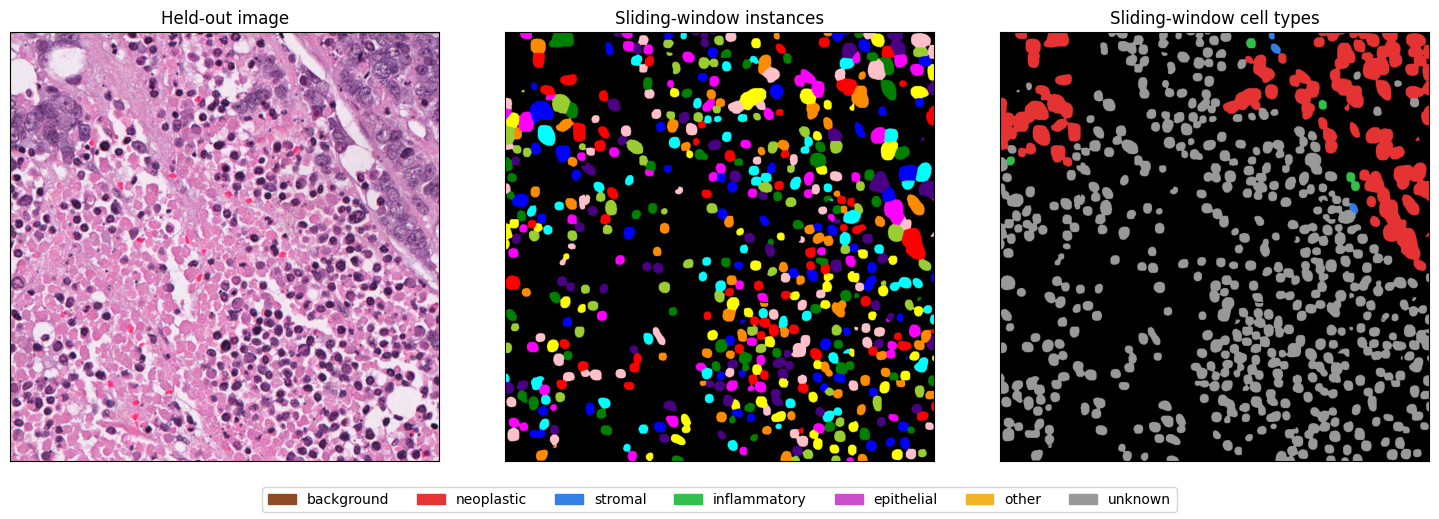
Use sliding windows when predicting the full image exceeds GPU memory, or when a model requires a fixed input size. This keeps nuclei at their original pixel size instead of shrinking the image. Overlap can also reduce artifacts at crop edges compared with predicting separate, non-overlapping patches, at the cost of extra computation.
Run overlapping windows over the same image already in memory. Here, 256-pixel windows with a stride of 128 give 50% overlap. Predictions from overlapping windows are combined before separating individual nuclei. The resulting masks stay aligned with the original image.
Processing smaller windows reduces memory use inside the network. The full image and combined prediction maps must still fit on the model’s device. Windows are not transferred one at a time from CPU to GPU. For whole slides, use the WSI example.
# Reuse the image normalized above; do not normalize individual windows.
sliding_prediction = model.predict(
    image,
    use_sliding_win=True,
    window_size=(256, 256),
    stride=128,
)

sliding_result = model.post_process(sliding_prediction, use_async_postproc=False)
sliding_instances, sliding_classes = sliding_result["nuc"][0]
# Keep the same class colours and distinguish class 0 nuclei from background.
sliding_class_colors = class_palette[sliding_classes]
sliding_class_colors[sliding_instances == 0] = 0

sliding_fig, sliding_axes = plt.subplots(1, 3, figsize=(15, 5))

sliding_axes[0].imshow(raw_image)
sliding_axes[0].set_title("Held-out image")

sliding_axes[1].imshow(label2rgb(sliding_instances, bg_label=0))
sliding_axes[1].set_title("Sliding-window instances")

sliding_axes[2].imshow(sliding_class_colors)
sliding_axes[2].set_title("Sliding-window cell types")

for axis in sliding_axes:
    axis.set(xticks=[], yticks=[])

sliding_fig.legend(
    [Patch(color=colour) for colour in class_palette],
    class_names,
    loc="lower center",
    ncol=7,
)
sliding_fig.tight_layout(rect=(0, 0.08, 1, 1))
plt.show()
Save the masks#
Save one .npz file per image in predictions/, using its source filename.
Uncomment the block below to save both masks for the evaluation example.
Integer labels preserve nucleus IDs: zero is background and each positive number
identifies one nucleus. Cell-type IDs keep the meanings shown in the legend.
output_path = Path("predictions") / f"{image_path.stem}.npz"

# Uncomment to save; exclusive creation protects an existing result.
# output_path.parent.mkdir(exist_ok=True)
# with output_path.open("xb") as output:
#     np.savez_compressed(output, instances=instances, classes=classes)