
Prepare training data#
Prepare image patches and matching nucleus and cell-type labels from PanopTILs Refined for training. An instance label identifies one nucleus; a class label describes its type. The dataset is CC0-1.0 and builds on PanopTILs, BCSS and NuCLS.
Download the data, separate patients into training and validation sets, then crop images and labels together. Only nucleus instances and cell types are used here.
import json
import random
from pathlib import Path
from tempfile import TemporaryDirectory

import cv2
import matplotlib.pyplot as plt
import numpy as np
import polars as pl
from huggingface_hub import hf_hub_download
from matplotlib.patches import Patch
from scipy.io import loadmat, savemat
from skimage.color import label2rgb
from skimage.measure import regionprops

dataset_id = "csmp-hub/panoptils_refined"
revision = "21cc3a3985117c84fb399f0048920eba42fbba32"
archive_sha256 = "1ab3f0c2299e0c44f996e34c233846592a934aa3dcfc8e80cc983db85c771d18"
patch_size = 256
seed = 42
data_root = Path("../../data/panoptils-nuclei")
class_names = [
    "background",
    "neoplastic",
    "stromal",
    "inflammatory",
    "epithelial",
    "other",
    "unknown",
]
Download the dataset#
Download the complete archive from CSMP Hub. This walkthrough creates its own patient-separated training and validation split below, rather than using the Hub’s separate split files. Keep the same version throughout preparation and training.
archive = Path(
    hf_hub_download(
        repo_id=dataset_id,
        repo_type="dataset",
        filename="panoptils_refined.parquet",
        revision=revision,
    )
)
Split by patient#
Keep each patient’s images in one split so validation checks the model on new patients. Use about 80% of patients for training and 20% for validation.
dataset = pl.scan_parquet(archive).with_row_index("row")
# Load only the small metadata table; image bytes stay on disk.
regions = (
    dataset.select("row", "slide_name")
    .with_columns(
        pl.col("slide_name")
        .str.split("-")
        .list.slice(0, 3)
        .list.join("-")
        .alias("patient")
    )
    .collect()
)

# Slides from one patient share the first three TCGA identifier fields.
patients = sorted(regions["patient"].unique().to_list())
random.Random(seed).shuffle(patients)
validation_patients = patients[: max(1, len(patients) // 5)]

regions = regions.with_columns(
    pl.when(pl.col("patient").is_in(validation_patients))
    .then(pl.lit("validation"))
    .otherwise(pl.lit("train"))
    .alias("split"),
    pl.format("region_{}", pl.col("row").cast(pl.String).str.zfill(4)).alias("file"),
)
Read images and labels#
Each region contains an RGB image, a nucleus-instance mask and a cell-type mask. The masks must line up with the image. Zero in the instance mask is background; positive numbers identify nuclei.
def decode_png(data: bytes) -> np.ndarray:
    # Keep the original integer precision of the label masks.
    return cv2.imdecode(np.frombuffer(data, dtype=np.uint8), cv2.IMREAD_UNCHANGED)


def decode_region(
    image: bytes, instances: bytes, cell_types: bytes
) -> tuple[np.ndarray, np.ndarray, np.ndarray]:
    image = decode_png(image)
    instances = decode_png(instances)
    cell_types = decode_png(cell_types)

    # OpenCV reads BGR; plots and model inputs use RGB.
    image = cv2.cvtColor(image, cv2.COLOR_BGR2RGB)
    return image, instances, cell_types
Count nuclei by cell type#
Count each nucleus once in its original region, before cropping. This avoids counting it again when it crosses a patch boundary. Its type is the most common nonzero label inside its mask. A nucleus with no nonzero type label is “untyped”.
def count_nuclei(instances: np.ndarray, cell_types: np.ndarray) -> np.ndarray:
    counts = np.zeros(len(class_names), dtype=np.int64)
    for nucleus in regionprops(instances):
        # Inspect only this nucleus inside its bounding box.
        labels = cell_types[nucleus.slice][nucleus.image]
        votes = np.bincount(labels, minlength=len(class_names))
        votes[0] = 0  # Ignore background pixels when choosing the cell type.
        counts[votes.argmax()] += 1
    return counts
Save matching images and masks#
Save each image as a PNG and its two masks in a MAT file with the same name.
The MAT file keeps the nucleus IDs in inst and the cell types in type.
def save_sample(
    folder: Path,
    name: str,
    image: np.ndarray,
    instances: np.ndarray,
    cell_types: np.ndarray,
) -> None:
    image_path = folder / "images" / f"{name}.png"
    # Convert RGB back to OpenCV's BGR order before saving.
    if not cv2.imwrite(str(image_path), cv2.cvtColor(image, cv2.COLOR_RGB2BGR)):
        raise OSError(f"Could not write {image_path}")
    savemat(
        folder / "labels" / f"{name}.mat",
        {"inst": instances.astype(np.int32), "type": cell_types},
        do_compression=True,
    )
Create the patches#
Cut each 1024-pixel region into sixteen 256-pixel patches, cropping images and masks together. Cropping keeps nuclei at their original size. Keep whole validation images as well so you can inspect complete predictions later.
Choose a new data_root folder for preparation. Reuse it for training.
if data_root.exists():
    raise FileExistsError(f"Choose a new data_root folder: {data_root}")

counts = {
    split: {"regions": 0, "patches": 0, "class_instances": [0] * len(class_names)}
    for split in ("train", "validation")
}
data_root.parent.mkdir(parents=True, exist_ok=True)


# Publish the prepared folder only after every region has been saved.
with TemporaryDirectory(dir=data_root.parent, prefix=".panoptils-") as temporary:
    root = Path(temporary)
    for folder in (root / "train", root / "validation", root / "validation/regions"):
        (folder / "images").mkdir(parents=True)
        (folder / "labels").mkdir()

    # Decode one region at a time; Polars may buffer a larger Parquet row group.
    images = dataset.select("row", "image", "inst", "type")
    for batch in images.collect_batches(chunk_size=1):
        for row in batch.iter_rows(named=True):
            image, instances, cell_types = decode_region(
                row["image"], row["inst"], row["type"]
            )
            record = regions.row(row["row"], named=True)
            split = record["split"]
            region_name = record["file"]

            counts[split]["regions"] += 1
            counts[split]["class_instances"] = (
                np.array(counts[split]["class_instances"])
                + count_nuclei(instances, cell_types)
            ).tolist()

            # Keep unpatched validation regions for evaluating whole-image predictions.
            if split == "validation":
                save_sample(
                    root / "validation/regions",
                    region_name,
                    image,
                    instances,
                    cell_types,
                )

            # Crop both splits into patches, keeping each image and its masks aligned.
            height, width = instances.shape
            for y in range(0, height, patch_size):
                for x in range(0, width, patch_size):
                    area = np.s_[y : y + patch_size, x : x + patch_size]
                    name = f"{region_name}_y{y:04d}_x{x:04d}"
                    save_sample(
                        root / split,
                        name,
                        image[area],
                        instances[area],
                        cell_types[area],
                    )
                    counts[split]["patches"] += 1

    manifest = {
        "dataset": dataset_id,
        "revision": revision,
        "sha256": archive_sha256,
        "patch_size": patch_size,
        "seed": seed,
        "samples": regions.select("row", "patient", "split", "file").to_dicts(),
        "splits": counts,
    }
    (root / "manifest.json").write_text(json.dumps(manifest, indent=2) + "\n")
    if data_root.exists():
        raise FileExistsError(data_root)

    root.rename(data_root)

for split, count in counts.items():
    print(f"{split}: {count['regions']} regions, {count['patches']} patches")
train: 1096 regions, 17536 patches
validation: 253 regions, 4048 patches
Inspect the nuclei and labels#
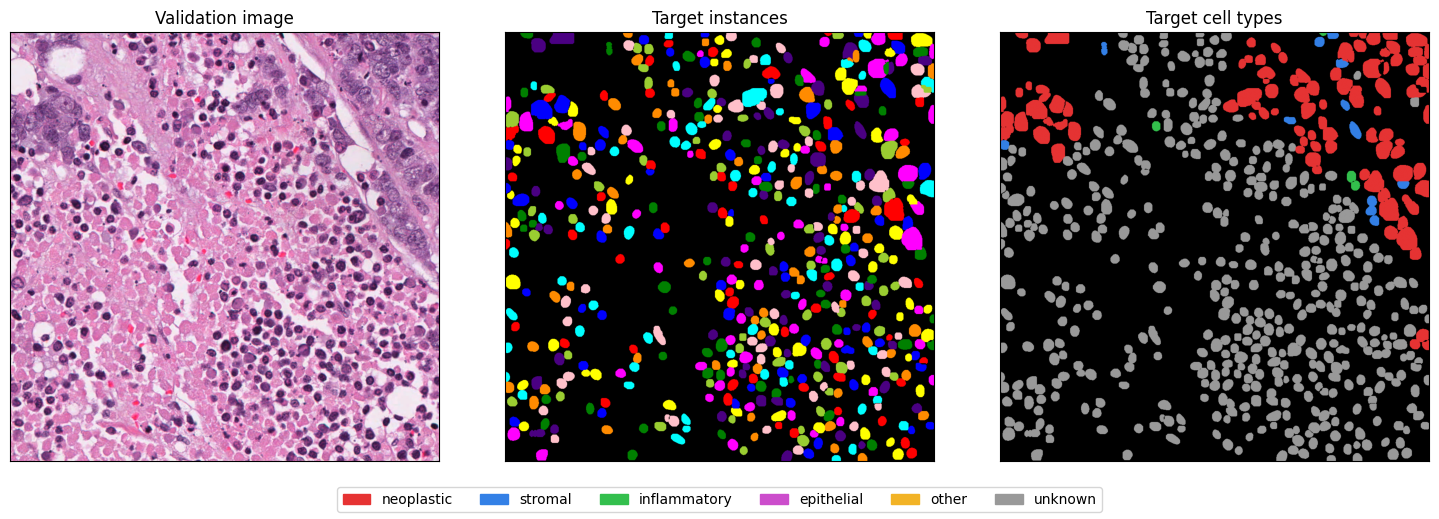
The table counts nuclei, not pixels or cropped fragments. Neoplastic means tumour cells; inflammatory means immune cells. Stromal cells support the surrounding tissue, and epithelial cells form tissue linings. “Other” and “unknown” are labels provided by the dataset. “Untyped” means a nucleus has no nonzero cell-type label.
Compare the image with its nucleus and cell-type labels.
manifest = json.loads((data_root / "manifest.json").read_text())

instance_counts = pl.DataFrame(
    {
        "Cell type": ["untyped (class 0)", *class_names[1:]],
        **{split: count["class_instances"] for split, count in manifest["splits"].items()},
    }
)
instance_counts
| Cell type | train | validation |
|---|---|---|
| str | i64 | i64 |
| "untyped (class 0)" | 4392 | 935 |
| "neoplastic" | 233199 | 45557 |
| "stromal" | 167019 | 32384 |
| "inflammatory" | 145961 | 19144 |
| "epithelial" | 1148 | 90 |
| "other" | 3727 | 493 |
| "unknown" | 24433 | 7709 |
image_path = sorted((data_root / "validation/regions/images").glob("*.png"))[0]
image = cv2.cvtColor(cv2.imread(str(image_path)), cv2.COLOR_BGR2RGB)
labels = loadmat(data_root / "validation/regions/labels" / f"{image_path.stem}.mat")
class_palette = np.array(
    [
        [0, 0, 0],
        [0.9, 0.2, 0.2],
        [0.2, 0.5, 0.9],
        [0.2, 0.75, 0.3],
        [0.8, 0.3, 0.8],
        [0.95, 0.7, 0.15],
        [0.6, 0.6, 0.6],
    ]
)
fig, axes = plt.subplots(1, 3, figsize=(15, 5))
axes[0].imshow(image)
axes[0].set_title("Validation image")
axes[1].imshow(label2rgb(labels["inst"], bg_label=0))
axes[1].set_title("Target instances")
axes[2].imshow(class_palette[labels["type"].astype(int)])
axes[2].set_title("Target cell types")
for axis in axes:
    axis.set(xticks=[], yticks=[])
fig.legend(
    [Patch(color=colour) for colour in class_palette[1:]],
    class_names[1:],
    loc="lower center",
    ncol=6,
)
fig.tight_layout(rect=(0, 0.08, 1, 1))
plt.show()
Continue with training.