
Segment a whole slide#
Segment nuclei across the TCGA-AC-A6IW breast slide using the PanopTILs model from training. This patient is in the tutorial’s validation split.
Select tissue tiles, save nucleus polygons, merge fragments at tile boundaries, and inspect the results at slide and nucleus scale. The output contains nuclei and cell types, not tissue-region segmentation.
The slide is an open-access TCGA image hosted by the NCI Genomic Data Commons (GDC). Please acknowledge TCGA and GDC when using it. The download is about 123 MB.
Setup#
This example uses cuCIM on Linux with an NVIDIA GPU. For CUDA 13, install:
python -m pip install cucim-cu13 "nvidia-nvimgcodec-cu13[nvjpeg2k,nvtiff]"
Use the corresponding cu12 packages with CUDA 12. The cell below enables
cuCIM’s GPU reader and loads the codecs for this JPEG2000-compressed slide.
Run it before importing the library in a fresh kernel.
Tiles and normalization stay on the GPU through model input. Instance reconstruction and polygon export use the CPU.
OpenSlide is also supported. Install openslide-python openslide-bin, skip the
cuCIM initialization cell, and set backend="OPENSLIDE" and read_device=None.
JPEG2000 decoders can produce slightly different nucleus boundaries and counts.
import os

# Choose cuCIM's GPU reader before it is imported.
os.environ["ENABLE_CUSLIDE2"] = "1"

# Make the installed decoder libraries available to cuCIM.
from nvidia import nvimgcodec
import json
from pathlib import Path

import geopandas as gpd
import matplotlib.pyplot as plt
import numpy as np
import polars as pl
import requests
import torch
from matplotlib.patches import Patch
from safetensors import safe_open
from shapely.geometry import box

from cellseg_models_pytorch.inference.post_processor import PostProcessor
from cellseg_models_pytorch.inference.wsi_segmenter import WsiSegmenter
from cellseg_models_pytorch.models.cellpose import CellPose
from cellseg_models_pytorch.transforms.functional.normalization import minmax_normalize
from cellseg_models_pytorch.wsi import SlideReader

torch.set_num_threads(2)
device = torch.device("cuda")
slide_path = Path("../../data/wsi/TCGA-AC-A6IW.svs")
checkpoint_path = Path("training-checkpoints/epoch_05/model.safetensors")
output_dir = Path("wsi-results")
tile_size = 1024
filter_level = 2
backend = "CUCIM"
read_device = "cuda"
print(f"Device: {device}")
Device: cuda
Download the slide#
Reuse the downloaded slide on later runs. A temporary file keeps an interrupted download separate from the complete slide.
slide_path.parent.mkdir(parents=True, exist_ok=True)
slide_url = "https://api.gdc.cancer.gov/data/24c1a3c2-cef7-48a3-9d76-3ded34894107"

if not slide_path.exists():
    download_path = slide_path.with_suffix(".part")
    with requests.get(slide_url, stream=True, timeout=120) as response:
        response.raise_for_status()
        with download_path.open("xb") as destination:
            for chunk in response.iter_content(chunk_size=1024 * 1024):
                destination.write(chunk)
    download_path.rename(slide_path)
Read the slide#
Level 0 is approximately 0.252 µm/pixel, close to the training images’ 0.25 µm/pixel. Keep this native resolution for prediction. Read a lower-resolution slide level for the tissue mask and overview.
reader = SlideReader(slide_path, backend=backend)
slide_height, slide_width = reader.dimensions
thumbnail_level = reader.level_from_max_dimension(2048)
thumbnail = reader.read_level(thumbnail_level)

# The polygon filter uses one physical scale, so this example needs square pixels.
pixel_height, pixel_size = reader.pixel_size
if not np.isclose(pixel_height, pixel_size):
    raise ValueError("This filtering example requires square pixels.")

print(f"Slide: {slide_width:,} × {slide_height:,} pixels")
print(f"Resolution: {pixel_size:.3f} µm/pixel")
Slide: 28,777 × 34,620 pixels
Resolution: 0.252 µm/pixel
Select tissue tiles#
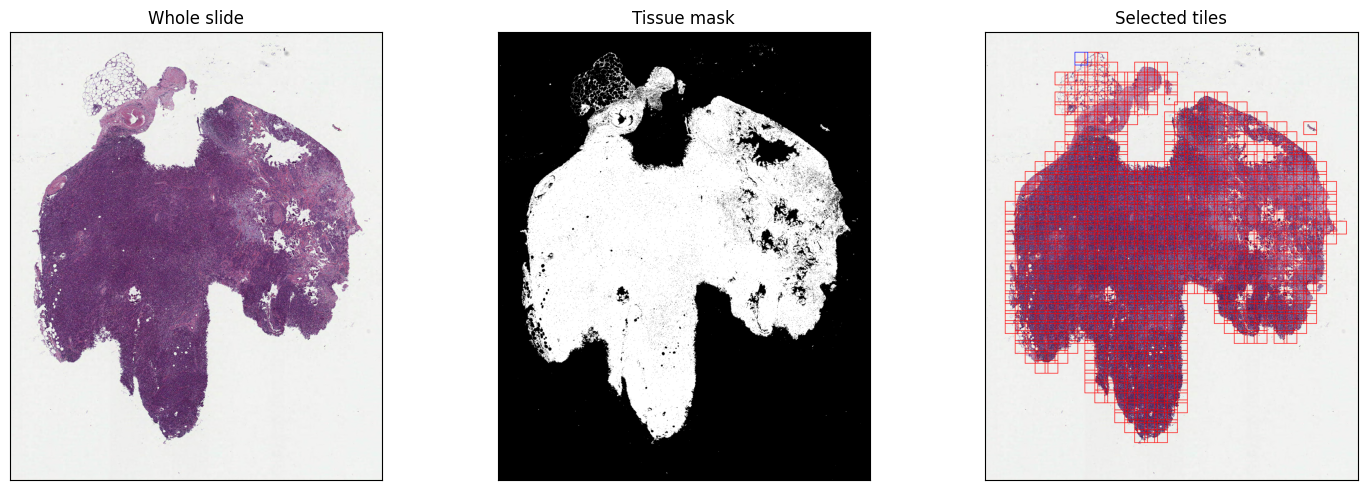
Inspect the mask before segmentation, especially around pale or fatty tissue. Use 25% overlap so neighboring predictions include nuclei beyond each tile edge. Keep all selected tiles so separate tissue fragments are included. The tile grid uses level-zero pixel coordinates.
_, tissue_mask = reader.get_tissue_mask(level=thumbnail_level)
coordinates = reader.get_tile_coordinates(
    width=tile_size,
    tissue_mask=tissue_mask,
    max_background=0.95,
    overlap=0.25,
)

# Draw the selected full-resolution tiles on the small thumbnail.
annotated = reader.get_annotated_thumbnail(thumbnail, coordinates, linewidth=3)
fig, axes = plt.subplots(1, 3, figsize=(15, 5))
axes[0].imshow(thumbnail)
axes[0].set_title("Whole slide")

axes[1].imshow(tissue_mask, cmap="gray")
axes[1].set_title("Tissue mask")

axes[2].imshow(annotated)
axes[2].set_title("Selected tiles")
for axis in axes:
    axis.set(xticks=[], yticks=[])
fig.tight_layout()
plt.show()

print(f"Selected tiles: {len(coordinates)}")
Selected tiles: 804
Load the model#
Use the saved PanopTILs weights and the same min-max normalization as training.
with safe_open(checkpoint_path, framework="pt", device="cpu") as weights:
    class_names = json.loads(weights.metadata()["class_names"])

model = CellPose.from_pretrained(checkpoint_path, device=device)
model.set_inference_mode(mixed_precision=False)
model.post_processor = PostProcessor("cellpose", {"use_gpu": device.type == "cuda"})


def normalization(*, image):
    # Use the training normalization on either NumPy images or CUDA tensors.
    return {"image": minmax_normalize(image)}
Segment the tissue#
Choose a new output_dir for each run. Each batch is processed and saved as
tile-level GeoParquet, so the full-resolution slide is never loaded into memory.
output_dir.mkdir(exist_ok=False)
segmenter = WsiSegmenter(
    reader=reader,
    model=model,
    level=0,
    coordinates=coordinates.coordinates,
    batch_size=4,
    normalization=normalization,
    read_device=read_device,
)
segmenter.segment(output_dir / "tiles")
100%|██████████| 201/201 [07:31<00:00, 2.24s/batch]
Merge the tile predictions#
Keep whole nuclei from the tile with the clearest view and retain unmatched detections from other tiles. The merged polygons and their unique IDs use level-zero pixel coordinates.
This example also removes small, thin fragments with filter_level=2. A polygon
is removed only when its area is below 12 µm² and its estimated thickness
(2 × area / perimeter) is below 1.2 µm. The slide’s pixel_size converts pixel
measurements to micrometers.
Set filter_level=0 or None to disable filtering, which is the library default.
Level 1 is more conservative; level 3 removes more objects. Small valid nuclei
can also be removed, so inspect the result, especially around thin stromal nuclei.
merged_path = output_dir / "nuclei.parquet"
segmenter.merge_instances(
    src=output_dir / "tiles",
    dst=merged_path,
    simplify_level=0.1,
    filter_level=filter_level,
    pixel_size=pixel_size,
)
nuclei = gpd.read_parquet(merged_path)

# Class 0 inside a predicted nucleus is distinct from empty background.
class_labels = ["untyped (class 0)", *class_names[1:]]
counts = pl.DataFrame(
    {
        "Cell type": class_labels,
        "Nuclei": np.bincount(
            nuclei["class_name"].to_numpy(), minlength=len(class_labels)
        ),
    }
)
print(f"Merged nuclei: {len(nuclei):,}")
counts
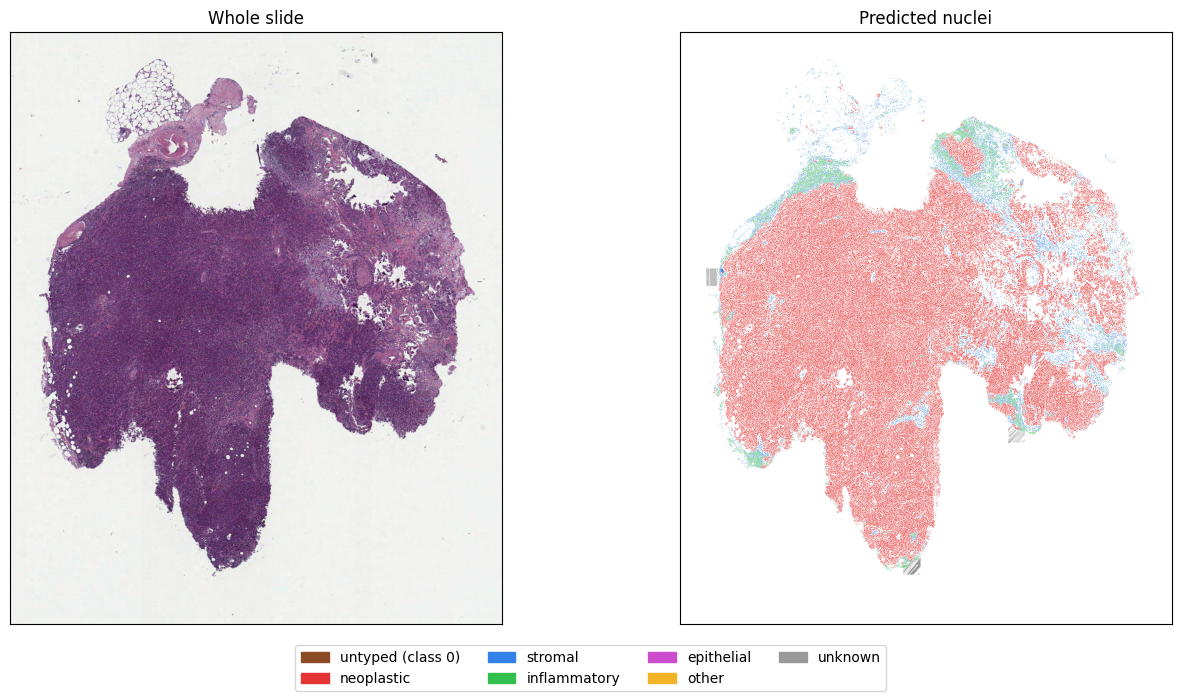
Merged nuclei: 173,823
| Cell type | Nuclei |
|---|---|
| str | i64 |
| "untyped (class 0)" | 0 |
| "neoplastic" | 131941 |
| "stromal" | 21655 |
| "inflammatory" | 15011 |
| "epithelial" | 0 |
| "other" | 0 |
| "unknown" | 5216 |
Inspect the whole-slide result#
Use the same colours in the slide overview and detailed overlays. Inspect tissue edges as well as dense cell regions for false positives. Cell-type predictions are model outputs; this slide does not have complete nucleus labels for a whole-slide accuracy score.
class_palette = np.array(
    [
        [0.55, 0.3, 0.15],
        [0.9, 0.2, 0.2],
        [0.2, 0.5, 0.9],
        [0.2, 0.75, 0.3],
        [0.8, 0.3, 0.8],
        [0.95, 0.7, 0.15],
        [0.6, 0.6, 0.6],
    ]
)
colours = class_palette[nuclei["class_name"].to_numpy()]

fig, axes = plt.subplots(1, 2, figsize=(14, 7))
axes[0].imshow(thumbnail, extent=(0, slide_width, slide_height, 0))
axes[0].set_title("Whole slide")

nuclei.plot(ax=axes[1], color=colours, linewidth=0)
axes[1].set_title("Predicted nuclei")
for axis in axes:
    # Image coordinates increase downward on the slide.
    axis.set(xlim=(0, slide_width), ylim=(slide_height, 0), xticks=[], yticks=[])
fig.legend(
    [Patch(color=colour) for colour in class_palette],
    class_labels,
    loc="lower center",
    ncol=4,
)
fig.tight_layout(rect=(0, 0.08, 1, 1))
plt.show()
Inspect nuclei around tile edges#
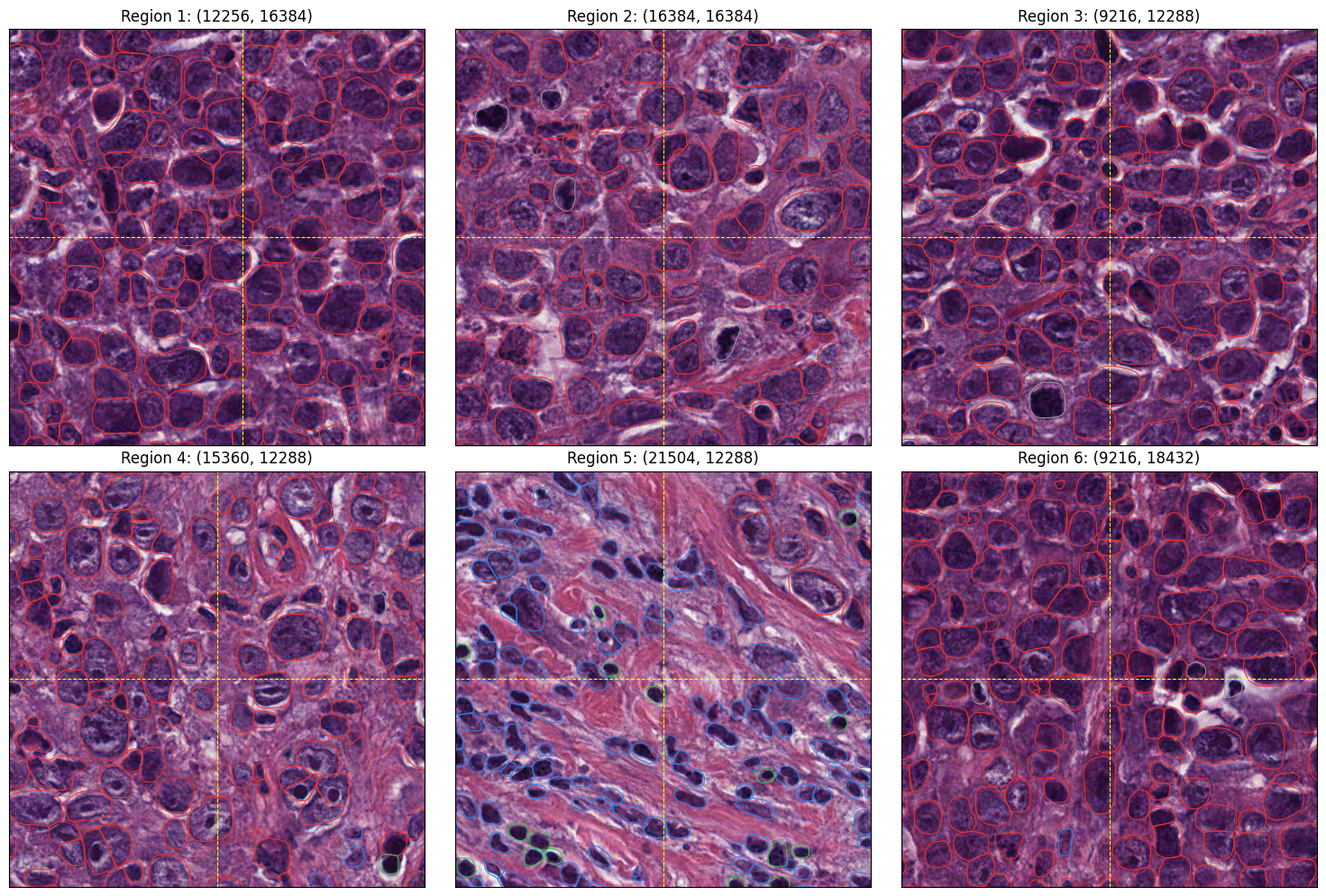
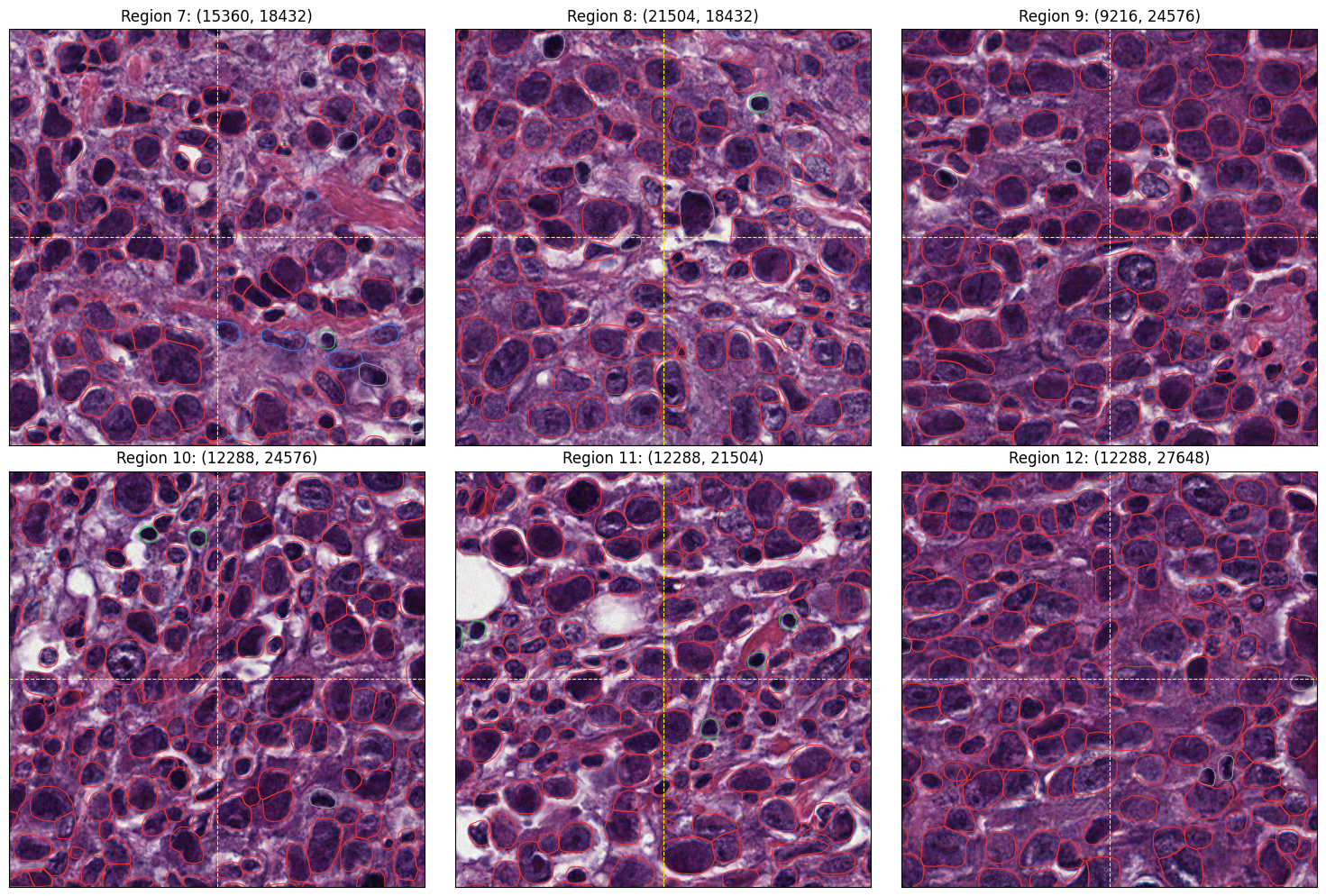
Inspect twelve regions across the specimen, including horizontal edges, vertical edges and tile junctions. Dashed lines mark input tile edges. Overlapping tiles provide another view of nuclei cut at these edges.
def plot_region(axis, bounds, title):
    x, y, width, height = bounds
    image = reader.read_region(bounds, level=0)
    axis.imshow(image, extent=(x, x + width, y + height, y))

    # Query only the polygons visible in this crop.
    indices = nuclei.sindex.query(
        box(x, y, x + width, y + height), predicate="intersects"
    )
    visible = nuclei.iloc[indices]
    visible.boundary.plot(
        ax=axis, color=class_palette[visible["class_name"].to_numpy()], linewidth=0.8
    )
    # Mark input tile edges, where a neighboring tile provides another view.
    for edge in x_seams:
        if x < edge < x + width:
            axis.axvline(edge, color="yellow", linestyle="--", linewidth=0.8)
    for edge in y_seams:
        if y < edge < y + height:
            axis.axhline(edge, color="yellow", linestyle="--", linewidth=0.8)

    axis.set(
        xlim=(x, x + width), ylim=(y + height, y), xticks=[], yticks=[], title=title
    )


x_seams = sorted({edge for x, y, w, h in coordinates for edge in (x, x + w)})
y_seams = sorted({edge for x, y, w, h in coordinates for edge in (y, y + h)})
seam_centres = [
    (12256, 16384),
    (16384, 16384),
    (9216, 12288),
    (15360, 12288),
    (21504, 12288),
    (9216, 18432),
    (15360, 18432),
    (21504, 18432),
    (9216, 24576),
    (12288, 24576),
    (12288, 21504),
    (12288, 27648),
]

# Keep each crop at native resolution and use the same field of view.
for start in (0, 6):
    fig, axes = plt.subplots(2, 3, figsize=(15, 10))
    for index, (axis, (x, y)) in enumerate(
        zip(axes.flat, seam_centres[start : start + 6]), start=start + 1
    ):
        plot_region(axis, (x - 256, y - 256, 512, 512), f"Region {index}: ({x}, {y})")
    fig.tight_layout()
    plt.show()
The merged result is saved in wsi-results/nuclei.parquet. Keep the tile files
while inspecting the merge; they preserve the predictions before stitching.