Train a model#
Train a model to find nuclei and identify their cell types. First run data preparation to create the images and labels used here.
This example runs five epochs. Inspect the validation predictions to decide whether to train longer.
Setup#
import json
import random
from pathlib import Path

import albumentations as A
import matplotlib.pyplot as plt
import numpy as np
import pandas as pd
import torch
from matplotlib.patches import Patch
from safetensors.torch import load_model, save_model
from skimage.color import label2rgb
from torch.optim.lr_scheduler import CosineAnnealingLR
from torch.utils.data import DataLoader

from cellseg_models_pytorch.inference.post_processor import PostProcessor
from cellseg_models_pytorch.losses import (
    CELoss,
    DiceLoss,
    JointLoss,
    MSE,
    MultiTaskLoss,
)
from cellseg_models_pytorch.metrics import panoptic_quality
from cellseg_models_pytorch.models.cellpose import CellPose
from cellseg_models_pytorch.transforms.albu_transforms import (
    AlbuStrongAugment,
    ApplyEach,
    CellposeTransform,
    MinMaxNormalization,
)
from cellseg_models_pytorch.transforms.functional.normalization import minmax_normalize
from cellseg_models_pytorch.torch_datasets import TrainDatasetFolder
from cellseg_models_pytorch.utils import FileHandler

seed = 42

# Seed the libraries that shuffle data and choose random augmentations.
random.seed(seed)
np.random.seed(seed)
torch.manual_seed(seed)
torch.set_num_threads(2)

# Use the GPU when one is available.
device = torch.device("cuda" if torch.cuda.is_available() else "cpu")

data_root = Path("../../data/panoptils-nuclei")
class_names = [
    "background",
    "neoplastic",
    "stromal",
    "inflammatory",
    "epithelial",
    "other",
    "unknown",
]

print(f"Device: {device}")
Device: cuda
Load images and labels#
Pair each image with its nucleus and cell-type labels. Scale image pixels to 0–1. For training, flip images and labels together and vary the image colours. Validation images are scaled without random changes.
# Apply the same spatial changes to images and masks.
train_transforms = A.Compose(
    [
        A.HorizontalFlip(p=0.33),
        A.VerticalFlip(p=0.33),
        AlbuStrongAugment(seed=seed),
        MinMaxNormalization(copy=True),
    ],
    seed=seed,
)

# Keep validation deterministic, with the same image scaling.
validation_transforms = A.Compose([MinMaxNormalization(copy=True)])

# Build flow targets from the augmented nucleus masks.
instance_transforms = ApplyEach([CellposeTransform(deduplicate=False)], as_list=True)

train_dataset = TrainDatasetFolder(
    str(data_root / "train/images"),
    str(data_root / "train/labels"),
    mask_keys=("inst", "type"),
    transforms=train_transforms,
    inst_transforms=instance_transforms,
)
validation_dataset = TrainDatasetFolder(
    str(data_root / "validation/images"),
    str(data_root / "validation/labels"),
    mask_keys=("inst", "type"),
    transforms=validation_transforms,
    inst_transforms=instance_transforms,
)

# Shuffle training patches; keep validation patches in a fixed order.
train_loader = DataLoader(train_dataset, batch_size=8, shuffle=True, num_workers=4)
validation_loader = DataLoader(
    validation_dataset,
    batch_size=8,
    shuffle=False,
    num_workers=4,
)

print(f"Patches: {len(train_dataset)} training, {len(validation_dataset)} validation")
Patches: 17536 training, 4048 validation
Training recipe#
Follow the Histolytics training recipe with two outputs: cell types and flows. Flows point nucleus pixels toward their centre and help separate touching nuclei.
Use cross-entropy and Dice loss for cell types, and mean squared error for flows.
Enable apply_sd=True to add a penalty on large class scores (spectral decoupling).
Train with AdamW and a cosine learning-rate schedule.
criterion = MultiTaskLoss(
    {
        "cellpose": JointLoss([MSE()]),
        "type_mask": JointLoss([CELoss(apply_sd=True), DiceLoss()]),
    },
    loss_weights={"cellpose": 1.0, "type_mask": 1.0},
).to(device)

learning_rate = 1e-4
num_epochs = 5
Initialize the network#
Use an EfficientNet-B5 encoder pretrained on ImageNet and randomly initialized segmentation layers. The encoder weights download on first use.
Set checkpoint_dir to a new folder for the saved model files.
model = CellPose(
    7,
    enc_name="efficientnet_b5",
    enc_pretrain=True,
    device=device,
).model

optimizer = torch.optim.AdamW(model.parameters(), lr=learning_rate)
scheduler = CosineAnnealingLR(optimizer, T_max=num_epochs, eta_min=0)

# A new directory protects checkpoints from earlier runs.
checkpoint_dir = Path("training-checkpoints")
checkpoint_dir.mkdir(exist_ok=False)
Optional: freeze the encoder#
To train only the segmentation layers, freeze the encoder before training:
encoder = model[model.enc_name]
for parameter in encoder.parameters():
    parameter.requires_grad_(False)
Add this immediately after model.train() in the epoch loop to keep the encoder’s
BatchNorm statistics fixed too:
encoder.eval()
Skip these steps to train the whole model. Reapply them if you resume with a frozen encoder.
Define the training steps#
Use the same flow and cell-type targets for training and validation.
def prepare_batch(batch: dict[str, torch.Tensor]):
    # Class labels use integers; flow targets use floating-point values.
    images = batch["image"].to(device)
    targets = {
        "type_mask": batch["type"].long().to(device),
        "cellpose": batch["cellpose_inst"].float().to(device),
    }
    return images, targets


def train_epoch(model, loader, optimizer):
    total = 0.0
    for batch in loader:
        images, targets = prepare_batch(batch)

        # Clear old gradients before predicting this batch.
        optimizer.zero_grad(set_to_none=True)
        output = model(images)["nuc"]
        loss = criterion(
            {"type_mask": output.type_map, "cellpose": output.aux_map}, targets
        )

        # Backpropagate the loss, then update the model weights.
        loss.backward()
        optimizer.step()

        # Weight each batch by its size so the last, smaller batch counts correctly.
        total += float(loss.detach()) * images.shape[0]

    return total / len(loader.dataset)


def validate_epoch(model, loader):
    total = 0.0
    with torch.inference_mode():
        for batch in loader:
            images, targets = prepare_batch(batch)

            output = model(images)["nuc"]
            loss = criterion(
                {"type_mask": output.type_map, "cellpose": output.aux_map}, targets
            )

            total += float(loss) * images.shape[0]

    return total / len(loader.dataset)
Save training progress#
Save model weights in model.safetensors and the optimizer, schedule and random
states in training-state.pt. Each epoch gets its own folder.
def save_checkpoint(epoch):
    numpy_rng = np.random.get_state()

    # Creating a new epoch folder protects both files from being overwritten.
    epoch_dir = checkpoint_dir / f"epoch_{epoch:02d}"
    epoch_dir.mkdir()
    save_model(
        model,
        epoch_dir / "model.safetensors",
        metadata={
            "class_names": json.dumps(class_names),
            "normalization": "global min-max, RGB float32",
        },
    )

    path = epoch_dir / "training-state.pt"
    with path.open("xb") as destination:
        torch.save(
            {
                "optimizer": optimizer.state_dict(),
                "scheduler": scheduler.state_dict(),
                "epoch": epoch,
                "encoder": model.enc_name,
                "class_names": class_names,
                "torch_rng": torch.get_rng_state(),
                "cuda_rng": torch.cuda.get_rng_state(device)
                if device.type == "cuda"
                else None,
                "python_rng": random.getstate(),
                "numpy_rng": (numpy_rng[0], numpy_rng[1].tolist(), *numpy_rng[2:]),
                "data_manifest": json.loads((data_root / "manifest.json").read_text()),
                "normalization": "global min-max, RGB float32",
                "augmentation_seed": seed,
                "num_workers": train_loader.num_workers,
                "num_epochs": num_epochs,
                "training_loss": training_loss,
                "validation_loss": validation_loss,
            },
            destination,
        )

    return path
Train and validate#
for epoch in range(num_epochs):
    # Use new random augmentations on each pass through the training set.
    train_transforms.set_random_seed(seed + epoch)
    model.train()
    training_loss = train_epoch(model, train_loader, optimizer)

    # Validation changes neither weights nor BatchNorm statistics.
    model.eval()
    validation_loss = validate_epoch(model, validation_loader)

    # Advance the learning-rate schedule and save the completed epoch.
    scheduler.step()
    saved_checkpoint = save_checkpoint(epoch + 1)

    print(
        f"Epoch {epoch + 1}: training loss {training_loss:.3f}, "
        f"validation loss {validation_loss:.3f}"
    )
Epoch 1: training loss 1.172, validation loss 0.820
Epoch 2: training loss 0.964, validation loss 0.767
Epoch 3: training loss 0.909, validation loss 0.752
Epoch 4: training loss 0.868, validation loss 0.735
Epoch 5: training loss 0.841, validation loss 0.828
Load the saved model#
Load the last epoch’s safetensors weights for prediction. Restore the separate training state to continue training from that epoch.
state = torch.load(saved_checkpoint, map_location="cpu", weights_only=True)
inference_model = CellPose(
    len(state["class_names"]),
    enc_name=state["encoder"],
    enc_pretrain=False,
    device=device,
)

restored = inference_model.model
load_model(
    restored, saved_checkpoint.with_name("model.safetensors"), device=str(device)
)

# Restore optimizer and scheduler state to keep the training schedule.
resumed_optimizer = torch.optim.AdamW(restored.parameters(), lr=learning_rate)
resumed_scheduler = CosineAnnealingLR(
    resumed_optimizer, T_max=state["scheduler"]["T_max"]
)
resumed_optimizer.load_state_dict(state["optimizer"])
resumed_scheduler.load_state_dict(state["scheduler"])


# Restore random states so a resumed run continues from this epoch.
random.setstate(state["python_rng"])
np.random.set_state(state["numpy_rng"])
torch.set_rng_state(state["torch_rng"])

if device.type == "cuda" and state["cuda_rng"] is not None:
    torch.cuda.set_rng_state(state["cuda_rng"], device)


# Switch to prediction mode before evaluating the reloaded weights.
inference_model.set_inference_mode(mixed_precision=False)
inference_model.post_processor = PostProcessor(
    "cellpose", {"use_gpu": device.type == "cuda"}
)

print("Reloaded model, optimizer and scheduler after epoch", state["epoch"])
Reloaded model, optimizer and scheduler after epoch 5
Check predictions on validation images#
Predict nuclei in 16 validation images at their original 1024-pixel size. These images come from patients that were not used for training.
Panoptic quality (PQ) measures how well predicted nuclei match the labels:
1 is perfect and 0 means no matches. The table shows the average score and nucleus
counts. Cell-type scores require both the correct type and a matching nucleus;
they average only images where that type appears in the labels or predictions.
NaN means there were no cells of that type to score. These results describe the
16 example images; inspect the masks too, especially for rare types.
region_paths = sorted((data_root / "validation/regions/images").glob("*.png"))

# Evaluate 16 validation images from patients outside the training set.
evaluation_paths = region_paths[:: max(1, len(region_paths) // 16)][:16]

records = []

for path in evaluation_paths:
    raw_image = FileHandler.read_img(path)
    labels = FileHandler.read_mat(
        data_root / "validation/regions/labels" / f"{path.stem}.mat"
    )

    # Use the same RGB scaling as the training and validation datasets.
    image = minmax_normalize(raw_image, copy=True)
    result = inference_model.post_process(
        inference_model.predict(image),
        use_async_postproc=False,
    )
    predicted_instances, predicted_classes = result["nuc"][0]

    records.append(
        {
            "class": "all nuclei",
            "PQ": panoptic_quality(labels["inst"], predicted_instances)["pq"],
            "target objects": len(np.unique(labels["inst"][labels["inst"] > 0])),
            "predicted objects": len(
                np.unique(predicted_instances[predicted_instances > 0])
            ),
        }
    )

    # Score each cell type separately to reveal weak performance on rare types.
    for class_id, name in enumerate(class_names[1:], start=1):
        true_class = np.where(labels["type"] == class_id, labels["inst"], 0)
        predicted_class = np.where(
            predicted_classes == class_id, predicted_instances, 0
        )
        true_count = len(np.unique(true_class[true_class > 0]))
        predicted_count = len(np.unique(predicted_class[predicted_class > 0]))
        score = panoptic_quality(true_class, predicted_class)["pq"]
        records.append(
            {
                "class": name,
                "PQ": score if true_count + predicted_count else np.nan,
                "target objects": true_count,
                "predicted objects": predicted_count,
            }
        )

# Average PQ over images; sum nucleus counts across all evaluated regions.
metrics = (
    pd.DataFrame(records)
    .groupby("class", sort=False)
    .agg(
        {
            "PQ": "mean",
            "target objects": "sum",
            "predicted objects": "sum",
        }
    )
    .round(3)
)

print(f"Held-out regions: {len(evaluation_paths)}")
metrics
Held-out regions: 16
| PQ | target objects | predicted objects | |
|---|---|---|---|
| class | |||
| all nuclei | 0.643 | 6756 | 7192 |
| neoplastic | 0.509 | 3082 | 2860 |
| stromal | 0.361 | 1740 | 1986 |
| inflammatory | 0.308 | 1202 | 1115 |
| epithelial | NaN | 0 | 0 |
| other | 0.000 | 3 | 0 |
| unknown | 0.219 | 657 | 1231 |
Compare the masks#
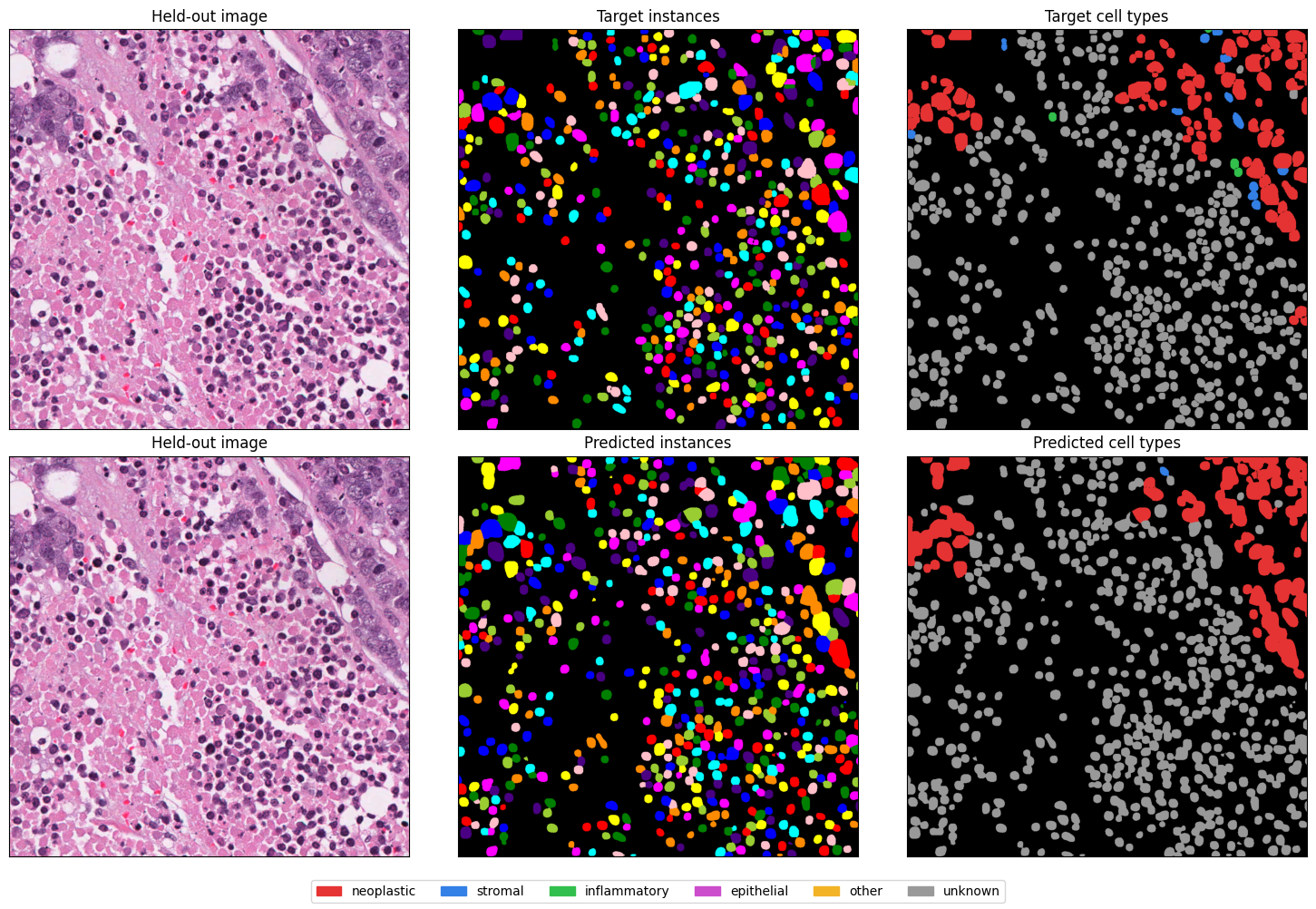
Both rows show the same validation image. The top row shows the dataset labels; the bottom row shows predictions. Look for missed nuclei, merged neighbours and incorrect cell types using the shared legend.
Gray means the dataset labels a nucleus as “unknown”. Many nuclei in this example have that label.
# Compare predictions with the labels for one validation image.
path = evaluation_paths[0]
raw_image = FileHandler.read_img(path)
labels = FileHandler.read_mat(
    data_root / "validation/regions/labels" / f"{path.stem}.mat"
)

image = minmax_normalize(raw_image, copy=True)
result = inference_model.post_process(
    inference_model.predict(image), use_async_postproc=False
)
predicted_instances, predicted_classes = result["nuc"][0]

# Fixed colours keep each class identical in target and prediction panels.
class_palette = np.array(
    [
        [0, 0, 0],
        [0.9, 0.2, 0.2],
        [0.2, 0.5, 0.9],
        [0.2, 0.75, 0.3],
        [0.8, 0.3, 0.8],
        [0.95, 0.7, 0.15],
        [0.6, 0.6, 0.6],
    ]
)

fig, axes = plt.subplots(2, 3, figsize=(15, 10))
axes[0, 0].imshow(raw_image)
axes[0, 0].set_title("Held-out image")

axes[0, 1].imshow(label2rgb(labels["inst"], bg_label=0))
axes[0, 1].set_title("Target instances")

axes[0, 2].imshow(class_palette[labels["type"].astype(int)])
axes[0, 2].set_title("Target cell types")

axes[1, 0].imshow(raw_image)
axes[1, 0].set_title("Held-out image")

axes[1, 1].imshow(label2rgb(predicted_instances, bg_label=0))
axes[1, 1].set_title("Predicted instances")

axes[1, 2].imshow(class_palette[predicted_classes])
axes[1, 2].set_title("Predicted cell types")

for axis in axes.flat:
    axis.set(xticks=[], yticks=[])

fig.legend(
    [Patch(color=colour) for colour in class_palette[1:]],
    class_names[1:],
    loc="lower center",
    ncol=6,
)
fig.tight_layout(rect=(0, 0.04, 1, 1))
plt.show()